Overview
The WVC uses AuralSync, a low-latency wireless protocol operating on the 2.4 GHz band. Range depends on the antenna, environment, and line-of-sight conditions. This article covers real-world range test results comparing the WVC against other wireless bass knobs.
Line-of-Sight Range Test
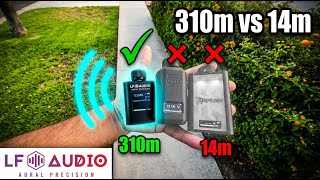
A controlled outdoor test was performed with three wireless bass knobs powered from the same source to eliminate power-level differences. All three base stations were placed side by side, and the knobs were walked away until each lost connectivity.
| Unit | Range (line of sight) |
|---|---|
| Competing wireless bass knob (Unit A) | |
| Competing wireless bass knob (Unit B) | |
| LF Audio WVC-LITE |
The WVC-LITE was used for this test, the most compact unit in the lineup. The WVC-PRO ships with a higher-gain antenna and achieves even greater range.
What Affects Range
Several factors influence real-world wireless range:
- Antenna size and gain: Higher-gain antennas transmit and receive more effectively. The WVC-PRO antenna provides roughly double the gain of the WVC-LITE antenna. See Antenna Options and Range for upgrade options.
- Line of sight: Walls, metal panels, and sound deadening absorb or reflect 2.4 GHz signals. A clear path between knob and base station gives the best range.
- Installation location: Mounting the base station behind metal panels or inside a sealed amplifier rack reduces range. Position the antenna where it has a clear path toward the cabin.
- Interference: Other 2.4 GHz devices (WiFi routers, Bluetooth, wireless cameras) can cause interference in crowded environments. The knob automatically hops through channels 1-14 to find the base station and locks onto the channel with the strongest RSSI. The base station itself stays on a fixed channel.
- Vehicle body: Metal vehicle bodies attenuate signals passing through them. The external antenna upgrade option routes the antenna outside the enclosure for maximum range in challenging builds.
Tips for Maximum Range
- Position the base station antenna vertically: Antennas radiate best perpendicular to their length. A vertical antenna reaches further horizontally.
- Avoid metal enclosures: If the base station is inside a metal box or amp rack, route an external antenna outside.
- Keep the knob in the cabin: The knob's antenna is inside the unit. Placing it on the dash or center console gives the clearest path to the base station in the trunk.
- Let the channel scanner do its job: The channel scanner lives on the knob, not the base station. The knob scans channels 1-14 when communication with the base station is lost (after a 3 s minimum since last data) and locks onto the channel with the strongest signal. To force a fresh scan, power-cycle the KNOB (not the base station); the base station's channel is fixed at boot. A scan completes in seconds.
Related Articles
- Antenna Options and Range: antenna upgrades and gain specifications