
Overview
The WVC wireless encoder knob is the handheld controller that communicates with your base unit. It is available in multiple variants and supports up to six weeks of battery life between charges. This guide covers knob operation, controls, modes, and accessories.
Knob Variants
| Variant | Encoders | Display | Best For |
|---|---|---|---|
| Single Knob | 1 | 1 OLED 128x128 | Simple systems with one volume zone |
| Dual Knob | 2 | 1 OLED 128x128 + 1 OLED 128x32 | Two-zone systems (for example, mains + subwoofer) |
| Concentric Knob | 2 (concentric shaft) | 1 OLED 128x128 | Two-zone control in a compact form factor |
| Quad Knob | 4 | 1 OLED 128x128 + 1 OLED 128x32 | Four-zone independent control. The two outer rings are rotate-only; the two inner shafts also support click actions. |
| Dual PRO Knob | 2 | 2.41" AMOLED touchscreen | Two-zone control with live system data on screen. See the PRO Knob Guide. |
| Quad PRO Knob | 4 (two concentric shafts) | 2.41" AMOLED touchscreen | Four-zone control with live system data on screen. See the PRO Knob Guide. |
All knob variants are compatible with all WVC base station models. See Channel Groups and Multi-Unit Control for how encoders map to zones.
The rest of this article describes the four knobs with monochrome displays. The Dual PRO Knob and Quad PRO Knob run different firmware with a touchscreen interface, their own settings menu and their own sleep behaviour. They are covered separately in the PRO Knob Guide.
Controls
Single Encoder Knob
- Rotate: adjust volume for the active channel group.
- Short press: action depends on the Click Action setting (see callout below). By default the short press toggles between Slow Mode and Fast Mode.
- Double-click: cycle to the next channel group. The display shows the group's custom name (for example, "Front", "Sub") if one has been set, otherwise "Group 1", "Group 2", etc.
- Long press: open the settings menu.
Click action: The short-press action is set on the knob itself, under Knob Settings > Click Action. Options are Speed (default, toggles Slow / Fast Mode) and Mute (a short press sets your channel groups to 0). After a Mute, a turn raises only the channel group that encoder controls. Double-click to reach the next group and turn it up.
Mute reaches up to 12 channel groups. With base station firmware 4.12.1 or newer, groups 13 and up keep playing. If you need Mute to silence everything, use 12 groups or fewer.
Dual Encoder Knob
- Top encoder: controls the first channel group (same controls as Single Knob)
- Bottom encoder: controls the second channel group independently
- Double-click either encoder: advances to the next channel group. Whether the two encoders move together or independently depends on the Channel Group mode (see Mapping Encoders to Channel Groups below).
Concentric Knob
The Concentric knob places two encoders on a single stacked shaft. Both rings rotate to control volume, each with its own channel group. Only the inner shaft presses, so the click actions (short press, double-click, long press) all belong to the inner encoder; the outer ring is rotate-only.
Quad Knob
The Quad knob exposes 4 encoder positions, each mapped to its own channel group. All four encoders rotate to control volume. The two inner shafts support click actions (short press, double-click, long press); the two outer rings are rotate-only. The push switch on a stacked concentric encoder acts on the centre shaft, which is why the inner ring is the one that clicks.
Mapping Encoders to Channel Groups
On the Dual, Concentric, and Quad knobs (firmware 4.1.2 or newer), a Channel Group setting in Knob Settings controls how the encoders map to your channel groups:
- Linear (default): the encoders move through your groups together.
- Dynamic: each encoder advances to the next group on its own.
- Manual: you pin each encoder to a fixed group using the Assign Encoders... sub-menu, and the assignments stay put.
By default the encoders spread evenly across however many groups you have and re-balance automatically when you add or remove a group. For example, on a Quad knob with two groups the left knob controls Group 1 and the right knob controls Group 2; with four groups each ring controls its own group. See Channel Groups and Multi-Unit Control for the full walkthrough.
Volume Modes
Slow Mode
Each click of the encoder changes volume by approximately 1%. Use this for fine-tuning.
Fast Mode
Each click changes volume by a configurable percentage (default: 4%; adjustable from 2% to 50% under Knob Settings > Fast Mode Speed on the knob itself). Use this for quick, large adjustments. For example, jumping from 100% to 0% in 10 clicks when set to 10%.
Battery and Charging
- Charge the knob for approximately one hour before first use.
- Battery life is up to six weeks between charges.
- Charge using the included USB-A to USB-C fast charging cable.
- The knob automatically sleeps when not in use. There is no need to turn it off. Leave it on at all times.
- How long the knob waits before sleeping, and how deeply it sleeps, are both set on the knob itself. See Auto Shutoff and Sleep below.
- To turn the knob on for the first time, use a small screwdriver or similar tool to press the button on the bottom of the unit.
Temperature Care
Like any lithium battery, the knob's cell lasts longest and performs best at normal room temperature, around 59 to 77 °F (15 to 25 °C). Cold and heat affect it in different ways, and only one of the two undoes itself.
Cold is temporary. In a freezing vehicle the knob runs for less time between charges than it usually would. Nothing is lost: the runtime comes back as soon as the knob warms up again.
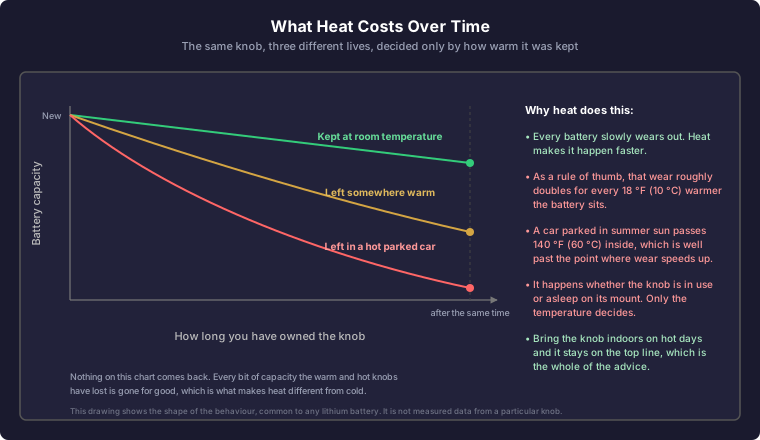
Heat is not. Prolonged extreme heat, for example a vehicle parked in direct summer sun, permanently shortens how long the battery will last over its life. It does this whether the knob is in use or sitting asleep on its mount.
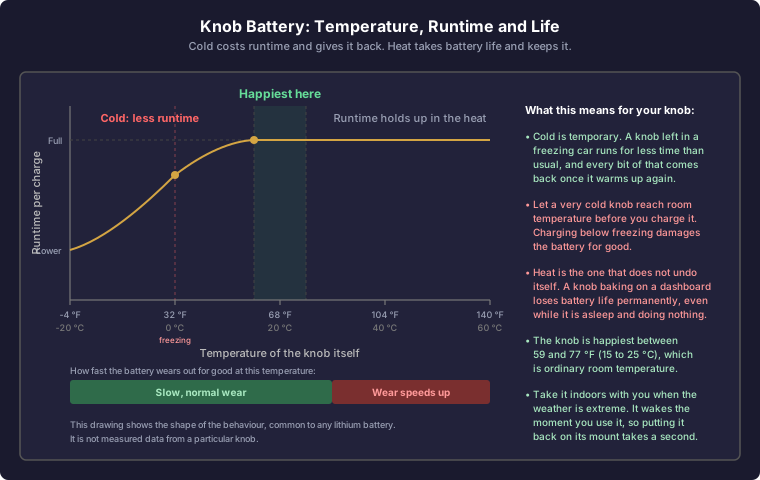
Let a very cold knob reach room temperature before you charge it. Charging a lithium battery while it is below freezing damages it permanently, and this is the one case where cold does lasting harm.
If you live somewhere with very hot summers or very cold winters, bring the knob indoors rather than leaving it in the vehicle for long stretches. It wakes as soon as you use it, so taking it with you and dropping it back on its mount takes only a moment.
What heat costs is easy to miss, because none of it shows up on the day. It arrives later, as a knob that wants charging more often after a couple of summers than it did when it was new.
Auto Shutoff and Sleep
The knob sleeps on its own after a period of inactivity and wakes when you use it again. Two separate settings control this, and both live on the knob itself. To reach them, long-press an encoder to open the menu, then select Knob Settings.
Sleep Timeout
Sleep Timeout sets how long the knob waits after your last input before it goes to sleep. The range is 10 to 240 seconds, and the default is 30 seconds.
You always get a warning first: for the last 5 seconds the display shows an Auto shut-off in... countdown, and any input cancels it. The timeout is also extended automatically while you have the menu open, and while the knob is waiting to hear back from the base station just after pairing.
Sleep is suspended entirely in two situations: while Competition Mode is enabled, and while a firmware update is running.
Sleep Mode: Light or Deep
Sleep Mode chooses how deeply the knob sleeps. It is available on the Dual, Concentric, and Quad knobs.
- Light (default): the knob keeps its wireless link to the base station alive while it sleeps, so it wakes essentially instantly and is ready to control volume straight away.
- Deep: the knob powers down considerably further, for the longest battery life. Waking takes roughly a second, because the knob restarts and re-establishes its link to the base station first. It is a small, barely noticeable delay rather than a wait.
The Single knob has no Sleep Mode setting. It always uses the deeper sleep, so expect that same roughly one-second wake on that variant.
Waking the Knob
How you wake the knob depends on the variant and the sleep mode in use.
| Knob and mode | How to wake it |
|---|---|
| Single knob | Turn the encoder |
| Dual, Concentric, or Quad knob on Light | Turn any encoder, or press one |
| Dual or Concentric knob on Deep | Press an encoder |
| Quad knob on Deep | Press one of the two inner shafts (the outer rings do not press) |
On Deep sleep, turning an encoder does not wake the knob. Press it instead. Knobs on firmware older than 4.4.5 show an on-screen message when you enable Deep sleep that says the opposite. The message was wrong, not the behavior; update the knob and it will match what is described here. See Firmware Updates.
There is no need to power the knob off when you leave your vehicle. Leave it switched on and let sleep handle battery conservation, even if the knob sits in the car for days. Light is the default and wakes fastest. Deep gives you the longest possible time between charges for a wake delay most people never notice, so it is worth trying if your knob often goes unused for days at a time.
Competition Mode
When Competition Mode is enabled (via the AuralSync app or the base station settings), the knob display stays on continuously and never sleeps. This is useful during SPL competitions or shows where you need constant visibility and controlled behavior.
Competition Mode acts only when the base station has not heard any paired knob or display for about 6 seconds. Any knob, RTC, or display that stays connected keeps your system playing. When the base station hears none of them, it does what the setting says:
- Mute sets every channel group to 0 at once.
- Limit Volume (shown as Limit Vol on the knob) slowly turns every channel group all the way down. It goes from full volume to 0 in about 10 seconds. It stops if a knob or display connects again.
In both modes the main base station's volume does not come back up by itself. Turn it back up from your knob or RTC. A linked base station is different, see below.
A BassWatch running on battery drops its link when its screen turns off, so it does not keep your system playing. A PRO knob keeps its link with the screen off only on firmware 4.12.3 or newer.
Linked Base Stations
Competition Mode works when you link two or more base stations. Update every base station to firmware 4.12.1 or newer.
- A linked base station follows the main base station. When the main one mutes or turns down, so does the linked one.
- A linked base station also mutes or turns down if it cannot hear the main base station for about 30 seconds. When it hears the main base station again, it goes back to the main base station's levels by itself.
- Right after power-on, a linked base station can stay quiet until it hears the main base station again.
On older firmware, a linked base station muted itself in Competition Mode, even while the main base station was playing.
See Using Multiple WVC Units Together for how to link base stations.
Clip Warnings on the Knob Display
Starting in firmware 3.10.0, the knob shows live clip warnings reported by the base unit so you can see input clipping at a glance without opening the app or looking at the WVC display.
- Volume screens: A CLIP indicator appears next to the temperature reading on every screen as soon as any input is clipping. This is a system-wide indicator. If any RCA input is being driven into clipping, you will see it here.
- FFT / Equalizer screen (PRO only): A per-channel CLIP marker appears on each input panel that is currently clipping. This lets you see exactly which channel is being overdriven so you can dial back the right output on your source or DSP.
- Severity: The CLIP marker grows as the level of clipping increases: first as plain text, then as a boxed marker, then as a filled badge. A filled badge indicates sustained, severe clipping that should be addressed immediately by reducing the source level.
What to do when you see CLIP: Reduce the volume on your head unit, DSP, or upstream source until the indicator clears. Persistent clipping degrades sound quality and can stress amplifiers and speakers, especially at low frequencies.
Real music can briefly hit clipping on transient peaks without sounding bad. A solid, steady CLIP marker is the one you want to address. Brief flickers during loud passages are usually fine.
Note (firmware 4.1.0): On Knob firmware 4.1.0 or newer, when paired with a WVC-PRO or WVC-PRO 6 base on firmware 4.1.0 or newer, the Base Settings menu adds a Clip Detection item with four levels (Off, Low, Medium, High). This controls how readily the CLIP indicators light up. The value syncs with the WVC touchscreen and the AuralSync app, so changing it on any one surface updates them all. See Signal Analysis Features for what each level does.
High Speed
The knob and your base station can talk in one of two wireless modes. Long Range mode reaches the furthest. High Speed mode carries more data, which lets the base station send the knob's readings more often when the two are close together.
This setting is On by default (Knob firmware 4.8.0 or newer), the same as on the WDD-LITE display and the RTC. Leaving it on costs nothing at a distance, and nothing in battery life: the base station makes the final decision and speeds the link up only when the knob is close enough and its own firmware is 4.6.0 or newer. As you move further away it returns the link to Long Range on its own. With the setting off, the link stays in Long Range whatever the distance.
To change it, long-press the encoder to open the menu and go to Knob Settings > High Speed. There is no restart; the change takes effect within about ten seconds.
The signal-strength bars in the top bar show which mode is in use: solid bars mean the link is running in High Speed, dotted bars mean Long Range. Knob Info also lists it as Link: HS or Link: LR. On the Single and Dual knobs this indicator is new in 4.8.0 and still being confirmed against the base station; if yours reads High Speed while the knob is far from the base, let us know and treat the bars as signal strength only.
If the knob disconnects or stops responding when you carry it away from the base station, set High Speed to Off. Long Range mode trades refresh rate for reach, which is the right trade when range is the problem.
Factory Reset
Long-press the encoder to open the menu, navigate to Advanced > Factory Reset > Reset, and confirm. This clears pairing and saved settings, and returns the knob to its first-boot state.
Smart Home Menu
Knobs with firmware 3.9.0+ have a Smart Home menu (Advanced > Smart Home) where the WVC base station's home-mode state can be toggled and re-paired. See Smart Home Integration.
Knob Mounts and Cases
All mounts use double-sided tape and built-in magnets to secure the knob in place. When installing a replacement mount, ensure the two magnets in the holder base are oriented to attract (not repel) the magnets in the knob before pressing them fully into place.