
Overview
This article covers the physical installation of all WVC models: wiring, antenna connection, RCA hookup, temperature probe placement, and first-time power-on. Complete these steps before configuring channel groups, IDS, or any other software settings.
For a video-only walkthrough, see the Quick Install Guide.
Connector Layout
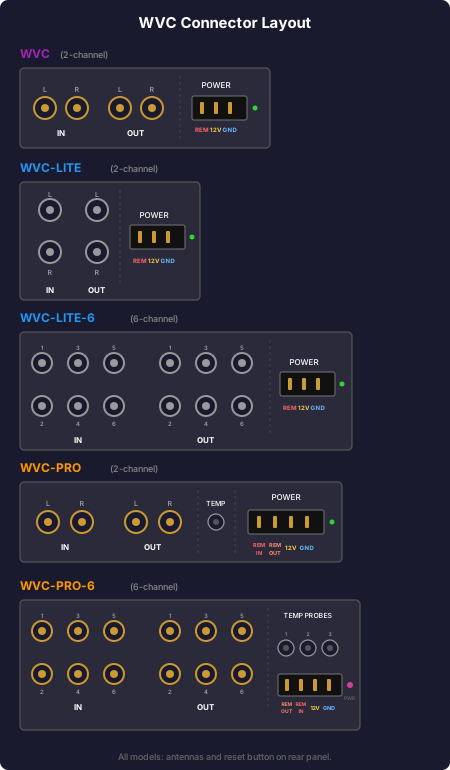
Step 1: Wire the Power Connector
The power connector pin layout varies by model. Always refer to the connector layout image above and to the labels printed on your unit's case before wiring. The pin layouts below describe each port from left to right as you face the rear of the unit.
WVC-PRO 2-Channel (4-Pin Connector)
| Pin (Left to Right) | Wire |
|---|---|
| Pin 1 | Remote In: remote turn-on signal from head unit, DSP, or LOC |
| Pin 2 | Remote Out: optional, drives amplifier remote turn-on. Pairs with the Intelligent Drive System (IDS) to shut down amplifiers automatically on undervoltage or overtemperature |
| Pin 3 | 12 V+ from battery |
| Pin 4 | Ground |
WVC-PRO 6-Channel (4-Pin Connector)
The 6-channel WVC-PRO has Remote In and Remote Out swapped versus the 2-channel WVC-PRO. Always go by the labels on your unit's case.
| Pin (Left to Right) | Wire |
|---|---|
| Pin 1 | Remote Out: optional, drives amplifier remote turn-on. Pairs with the Intelligent Drive System (IDS) to shut down amplifiers automatically on undervoltage or overtemperature |
| Pin 2 | Remote In: remote turn-on signal from head unit, DSP, or LOC |
| Pin 3 | 12 V+ from battery |
| Pin 4 | Ground |
WVC, WVC-LITE, WVC-LITE 6-Channel (3-Pin Connector)
There is no Remote Out pin on these models.
| Pin (Left to Right) | Wire |
|---|---|
| Pin 1 | Remote In: remote turn-on signal from head unit, DSP, or LOC |
| Pin 2 | 12 V+ from battery |
| Pin 3 | Ground |
The Remote Out on the WVC-PRO is an optional but powerful feature. When used with the Intelligent Drive System (IDS), it can automatically cut power to your amplifiers if voltage drops too low or the amplifier temperature exceeds your configured threshold.
Step 2: Connect the Antennas
WVC-LITE and WVC-LITE 6-Channel
Both antenna ports on the rear of the unit are functionally equivalent. Attach the included small antennas to the rear ports.
WVC-PRO
The PRO has two antenna ports with distinct functions:
| Port | Position | Antenna |
|---|---|---|
| Primary (knob communication) | Left (outer) port | Long antenna |
| Bluetooth (AuralSync app) | Right (inner) port | Small antenna |
For installations with heavy sound deadening or metal enclosures that reduce wireless range, see the Antenna Options and Range article for upgrade options.
Step 3: Install the Temperature Probe (WVC-PRO Only)
The WVC-PRO includes a one-meter temperature probe for monitoring amplifier temperature.
- Plug the probe into the temperature probe port on the unit.
- Insert the probe into the plastic mounting bracket included in the box.
- Peel the backing off the double-sided tape on the bracket.
- Press the bracket firmly onto the surface of your amplifier. The probe will now continuously report amplifier temperature to the unit and the AuralSync app. You can configure a maximum temperature threshold in the Intelligent Drive System (IDS) settings.
Step 4: Connect RCA Cables
⚠️ Always connect and disconnect RCA cables with the unit powered OFF. Many DSPs, amplifiers, and other signal processors are sensitive to hot-swapping RCA connections. Connecting or disconnecting RCAs while equipment is powered on can damage the WVC, upstream components, or downstream amplifiers.
- Connect signal inputs to the left-side RCA jacks as labeled on the unit.
- Outputs map directly to their corresponding inputs (Input 1 → Output 1, etc.).
- On the 6-channel unit, all six channels are fully independent. Despite being labeled Left/Right, the internal circuitry has no connection between channels. You may use them as stereo pairs or as completely independent mono signals feeding separate devices. Cable routing tip: Route RCA cables toward the front of the unit. Antennas are on the rear. This separation is intentional to prevent RCA cables from acting as unintended antennas and picking up RF noise from the transmitter. Never wrap or run RCA cables along the antennas.
Step 5: First Power-On and Knob Setup
- Power on the WVC base unit.
- Before using the knob for the first time, charge it for approximately one hour using the included USB-A to USB-C cable.
- To turn the knob on for the first time, use a small screwdriver or similar tool to press the power button on the bottom of the knob.
- The knob will connect to the base unit automatically.
The knob can last up to six weeks between charges. Because it automatically sleeps when not in use, there is no need to turn it off. Leave it switched on at all times.
Step 6: Install the Knob Mount
The included plastic mount lets you attach the knob to any flat surface using the built-in magnet.
- Press the small magnet into the recess on the underside of the plastic mount until it clicks into place.
- Peel the backing off the adhesive pad on the bottom of the mount.
- Press the mount firmly onto your desired surface (dashboard, center console, etc.).
- The knob attaches magnetically. Simply place it on top of the mount.
Default Channel Group Configuration After Power-On
Once powered on and paired, your unit will have the following default channel group setup:
| Model | Default Groups |
|---|---|
| WVC-PRO (2-channel) | 1 channel group (all connected channels) |
| WVC-PRO (6-channel) | 2 channel groups: Channels 1 to 4 in Group 1, Channels 5 to 6 in Group 2 |
| WVC-LITE (2-channel) | 1 channel group |
| WVC-LITE (6-channel) | 2 channel groups: Channels 1 to 4 in Group 1, Channels 5 to 6 in Group 2 |
The 6-channel default is designed so you can connect mids/highs to the first four channels and subwoofers to the last two, then control them independently, or set the subwoofer group to Relative mode so it tracks your mids/highs volume automatically. See the Channel Groups and Multi-Unit Control article for full details.
Next Steps
Once your unit is physically installed and powered on:
- Pair with the AuralSync app → Getting Started
- Configure channel groups → Channel Groups and Multi-Unit Control
- Enable RCA gain if your head unit has low output voltage → RCA Signal Quality and Line Driver Principles
- Link multiple WVC units together → Channel Groups and Multi-Unit Control
- Update firmware → Firmware Updates